Parallel Tool Calls for Production LLM Agents in October 2026: Fan Out Independent Calls, Respect Dependencies, and Survive Partial Failures
Modern LLM APIs let a model request several tool calls in a single turn. Ask an agent "What's the weather in Tokyo, Paris, and Denver, and do I have meetings tomorrow?" and a capable model will often emit four tool calls at once instead of four round trips. Run those calls concurrently and the turn finishes in roughly the time of the slowest call rather than the sum of all of them. Run them carelessly and you get race conditions, duplicated side effects, blown rate limits, and conversations the provider rejects because a tool result went missing.

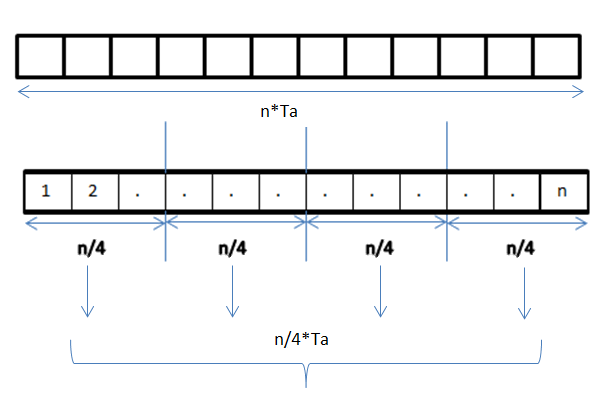
This guide covers how parallel tool calling works at the API level, how to execute the calls safely, and the failure cases that bite teams once real traffic arrives.
How parallel tool calls show up in the API
The shape differs by provider, but the contract is the same: one assistant message can contain several tool requests, each with its own ID, and you must send back one result per ID before the model continues.
- OpenAI-style chat APIs return an assistant message with a
tool_callsarray. Each entry has anid, a function name, and JSON arguments. You reply with onetool-role message per call, each carrying the matchingtool_call_id. Theparallel_tool_callsrequest parameter lets you turn the behavior off when you need strictly one call per turn. - Anthropic's Messages API returns multiple
tool_usecontent blocks in one assistant message. You answer with a single user message containing onetool_resultblock pertool_use_id. Settingdisable_parallel_tool_useinsidetool_choicelimits the model to at most one tool call.
Two rules hold almost everywhere. First, every tool call ID needs a result, even if that result is an error. Second, results belong together in the next turn; drip-feeding them across several messages usually produces a validation error or confuses the model.
Decide which tools are safe to run concurrently
The model decides what to call. You decide how to run it. Not every batch the model emits should execute simultaneously, so classify each tool when you register it.
Read-only tools
Search, lookup, fetch, and "get" operations with no side effects are the easy case. Run them concurrently with a concurrency cap.
Side-effecting tools
Sending email, writing to a database, charging a card, or creating a ticket need more care. Two writes to the same record in one batch can race. Two "send email" calls with near-identical arguments may be the model hedging, not a real request for two emails. For these tools, consider running them sequentially in the order the model listed them, attaching an idempotency key to each call, and requiring approval if the batch contains more than one write to the same resource.
Tools with hidden dependencies
Sometimes the model emits calls that depend on each other, such as create_folder and upload_file into that folder, in the same turn. The model cannot use the output of one call as input to another within a single turn, so the second call is usually guessing an ID or path. Detect this case and refuse to run the dependent call; return an error result telling the model to retry after the first call completes. The model will usually issue the dependent call on the next turn with the real ID.
A simple way to encode this is a per-tool metadata record:
TOOLS = {
    "get_weather":    {"side_effects": False, "resource_key": None},
    "search_docs":    {"side_effects": False, "resource_key": None},
    "update_ticket":  {"side_effects": True,  "resource_key": "ticket_id"},
    "send_email":     {"side_effects": True,  "resource_key": "to"},
}
The executor reads this before scheduling anything.
A practical executor
The following Python sketch uses asyncio to run read-only calls concurrently, serialize writes, apply per-call timeouts, and always produce one result per ID.
import asyncio, json

MAX_CONCURRENCY = 4
CALL_TIMEOUT_S = 20

async def run_one(call, sem):
    meta = TOOLS.get(call.name)
    if meta is None:
        return error_result(call.id, f"Unknown tool: {call.name}")
    try:
        args = json.loads(call.arguments)
    except json.JSONDecodeError as e:
        return error_result(call.id, f"Arguments were not valid JSON: {e}")
    async with sem:
        try:
            out = await asyncio.wait_for(
                dispatch(call.name, args, idem_key=call.id),
                timeout=CALL_TIMEOUT_S,
            )
            return ok_result(call.id, out)
        except asyncio.TimeoutError:
            return error_result(call.id, f"{call.name} timed out after {CALL_TIMEOUT_S}s")
        except Exception as e:
            return error_result(call.id, f"{call.name} failed: {type(e).__name__}: {e}")

async def execute_batch(calls):
    sem = asyncio.Semaphore(MAX_CONCURRENCY)
    reads  = [c for c in calls if not TOOLS.get(c.name, {}).get("side_effects")]
    writes = [c for c in calls if TOOLS.get(c.name, {}).get("side_effects")]

    read_results = await asyncio.gather(*(run_one(c, sem) for c in reads))

    write_results = []
    for c in writes:                      # model order, one at a time
        write_results.append(await run_one(c, asyncio.Semaphore(1)))

    by_id = {r["id"]: r for r in read_results + write_results}
    return [by_id[c.id] for c in calls]   # original order, one per ID
A few details matter here:
- Errors become results, not exceptions.
run_onenever raises. A failed call turns into a tool result the model can read and react to, which keeps the conversation valid. - The tool call ID doubles as an idempotency key. If your agent loop retries the whole turn after a crash, downstream services can recognize the repeat write.
- Results come back in the original order. Most APIs match on ID rather than position, but keeping the order makes logs and replays far easier to read.
- Concurrency is capped. A model that emits fifteen searches at once should not open fifteen connections to a rate-limited API.
Handle partial failure deliberately
With parallel calls, "some succeeded, some failed" is the normal case, not an edge case. Decide your policy up front.
- Return everything and let the model adapt. This is the right default for read-only batches. If two of three weather lookups succeed, the model can answer with what it has and mention the gap.
- Make error messages actionable. "Error" teaches the model nothing. "Rate limited by calendar API; retry in about 30 seconds" or "ticket_id 4812 not found" gives it something to do next.
- Stop the batch on a failed write when later writes depend on it. If the first write in a sequential group fails, mark the remaining writes in that group as skipped with an explanation rather than executing them against an inconsistent state.
- Cap retries per turn. Combined with your agent's step budget, this keeps a flaky tool from turning one turn into dozens of retries.
Watch the context window
Parallel calls multiply the volume of tool output that lands in one turn. Five search calls each returning several kilobytes of text can crowd out the conversation history. Apply your truncation or summarization rules per result before you assemble the batch, and set an overall byte or token budget for the combined results of a single turn. If the batch exceeds it, trim the largest results first and say so in the result text so the model knows the content was shortened.
When to turn parallel calls off
Parallelism is not always worth it. Consider disabling it, either globally or per request, when:
- The agent mostly performs ordered workflows, like "create, then configure, then notify," where each step needs the previous result.
- You are using a smaller model that tends to emit redundant or guessed parallel calls in your evaluations.
- Every tool is a write against a shared resource and serialization is the safe default anyway.
- You need deterministic, step-by-step traces for audit or debugging.
You can also keep it on but tighten the system prompt: tell the model to batch only independent lookups and to wait for results before calling tools that need IDs from earlier calls. Then measure whether the guidance actually reduces guessed-dependency calls in your logs.
Test it before it ships
Parallel execution introduces timing-dependent bugs that a happy-path demo will not reveal. Add these cases to your test suite:
- A batch where one call times out and the others succeed. Confirm every ID gets a result and the next model request is accepted.
- A batch containing an unknown tool name and a call with malformed JSON arguments.
- Two writes to the same resource in one batch. Confirm they run in order and the second sees the first one's effect.
- A dependent call that references an ID the first call has not produced yet. Confirm it is rejected with a helpful message.
- A batch large enough to exceed your per-turn output budget.
- A crash mid-batch followed by a replay of the turn. Confirm idempotency keys prevent duplicate writes.
Log each batch as a unit: the tool call IDs, start and end times, outcome per call, and the bytes returned. Those traces show whether parallelism is actually cutting latency and where the slow tool in each batch lives.
The short version
Parallel tool calls are a cheap latency win when you treat the model's batch as a request, not a command. Run read-only calls concurrently under a cap, serialize writes, reject calls that depend on results that don't exist yet, turn every failure into a readable result, and always answer every tool call ID. Do that, and the agent gets faster without getting less predictable.


Comments
Post a Comment